
TOTPRadius Virtual Appliance - Download
Download & Install
TOTPRadius is now provided as a standard OVA file and an exported VM format for Microsoft Hyper-V. This ensures compatibility with a wide range of deployment scenarios. The virtual appliance supports Microsoft Hyper-V, XCP-NG, and other hypervisors that accept OVA imports. The appliance is free to use with up to 5 users. To increase the number of allowed users, you will need to obtain a license. You can download the appliance using the links below:
For hypervisors or deployment scenarios requiring additional customization, please contact us for assistance.
About
Installation and configuration
- Installation and initial configuration
- Network configuration
- Migrating from older versions
- LDAP Configuration
- Azure AD Configuration
- Self-service enrollment portal
- Web and LDAPS Certificates
- Syslog configuration
- Single-factor authentication exceptions
- Slave appliance mode
- Dynamic RADIUS Attributes
Integration guides
Blog
28-06-2026
Libre Key Companion: manufacturer-agnostic security key manager for Android and iOS
 We're happy to announce Libre Key Companion, a new open-source companion application for Android and iOS that lets you manage hardware security keys and smart cards from any manufacturer.
17-06-2026
An open-source, cross-platform way to manage your Token2 keys: Companion App - Rust edition
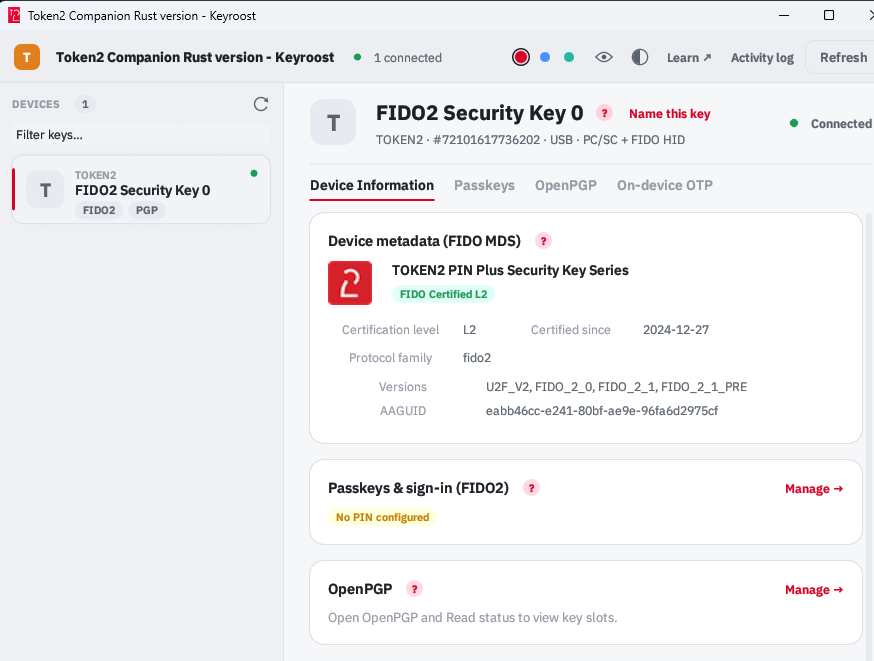 Token2 Companion - Rust edition - an open-source, cross-platform desktop tool for managing Token2 keys, and keys from other vendors too. It runs on Windows, macOS, and Linux, and the whole thing is open source: you can read it, audit it, build it, and extend it.
04-04-2026
Understanding FIDO User Verification Modes and the always_uv Setting
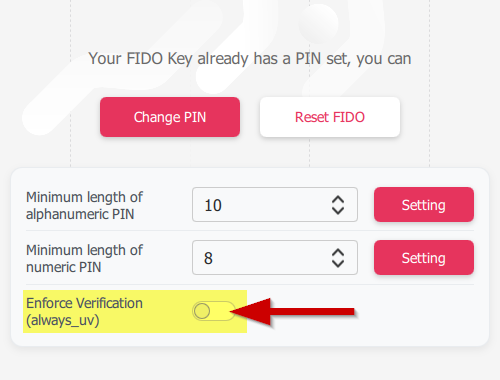 Token2 R3.3 and later FIDO2 keys enforce user verification by default with always_uv = true, improving security, though some platforms and apps like Windows 10, macOS, and certain legacy clients may fail to handle this override correctly.