
Token2 Companion App v2 User Manual
We will continue to maintain the Token2 Companion App as a proprietary application, providing features specifically designed for Token2 devices, such as firmware version information and device-specific management capabilities. At the same time, we are actively contributing to the development and promotion of a fully open-source alternative built in Rust. This vendor-agnostic tool is designed to manage FIDO2 security keys from any manufacturer, allowing users to handle multiple key types within a single application. It will support FIDO2 , OATH (including tokens from other vendors), OTP (for Token2 devices), PIV , and OpenPGP — all in one unified cross-platform tool thanks to Rust .
Overview
The Token2 Companion App v2 is a desktop application for managing OTP (One-Time Password), FIDO, and PIV functionalities. It allows users to add, manage, and secure authentication tokens, OTP accounts, and FIDO2 keys.
The main interface is organized into the following menus:
- File: General operations, device settings, and device information.
- OTP: Manage OTP accounts.
- FIDO: Manage FIDO2 credentials and settings, including PIN and fingerprints.
- PIV: Manage PIV settings.
- About: Information about the app and device.
Table of Contents
1. General
Device Information
This is the default screen displayed when you first launch the application. If you navigate away and want to return to this screen, you can access it through File > Device Information.
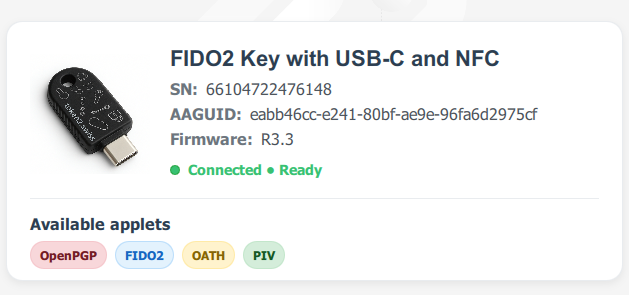
- Device Image: Visual representation of the FIDO2 key.
-
Serial Number (SN): Unique identifier for the device
AAGUID: Device's AAGUID
You can select either value above and press Ctrl + C to copy to the clipboard. - Firmware Version: Current firmware installed on the device.
- Connection Status: Indicates whether the device is
ConnectedandReady. - Available Applets: Lists the supported applets on the current device:
- OpenPGP
- FIDO2
- OATH (TOTP/HOTP)
- PIV
Device Settings (Channels)
Accessible via File > Device Settings.
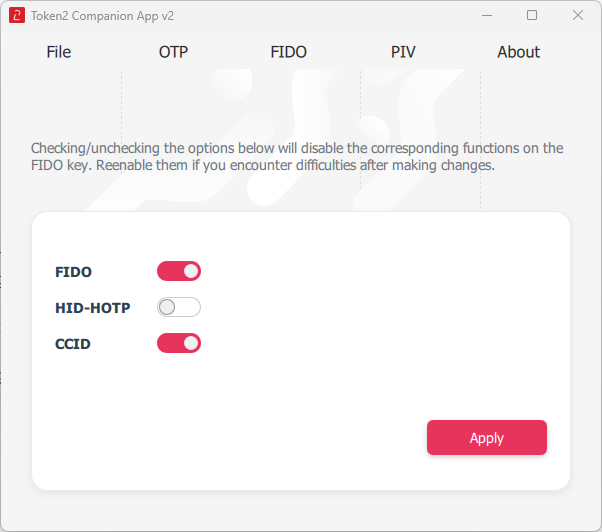
- CCID: Enable or disable the CCID channel.
- HID-HOTP: Enable or disable the HID channel.
Note: HID-HOTP is disabled by default on devices starting from Release 3.3. If you need HID-HOTP functionality (for applications such as UserLock), make sure to enable the HID channel.
- FIDO: Enable or disable the FIDO channel.
- Apply: Save changes to the channel settings.
Using only the FIDO channel on Windows requires the application to be executed with administrative privileges.
2. OTP Management
OTP Accounts
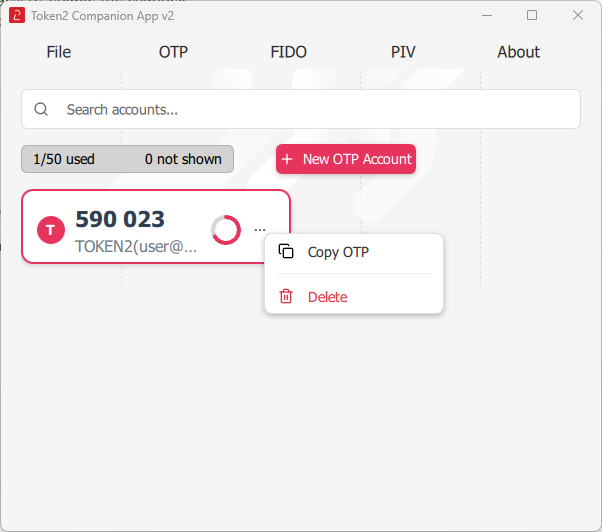
- View OTP Accounts: Displays a list of OTP accounts with their current OTP codes.
- OTP Display: Shows the OTP code, account name, and a progress indicator for the code's validity period.
- Actions:
- Copy OTP: Copy the OTP code to the clipboard.
- Delete: Remove the OTP account.
Adding a New OTP Account
- Click + New OTP Account.
- Fill in the account details (e.g., account name, secret key). Alternatively, use the QR button to read this data from TOTP-compliant QR code images displayed on the screen.
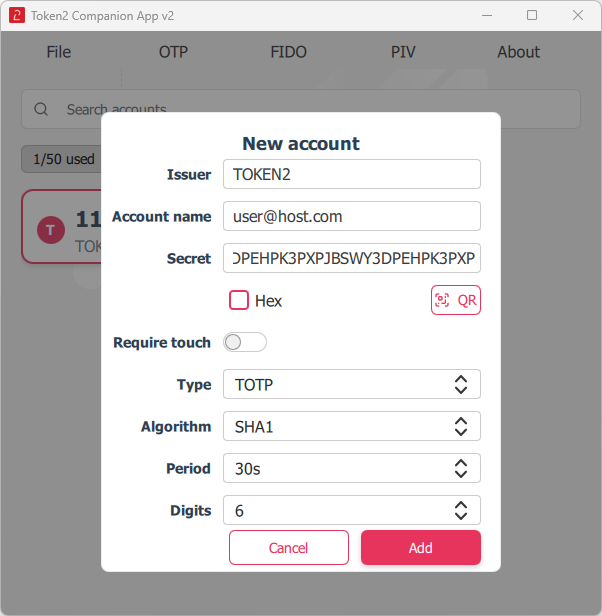
- Click 'Add' to save the new OTP account.
QR Scan
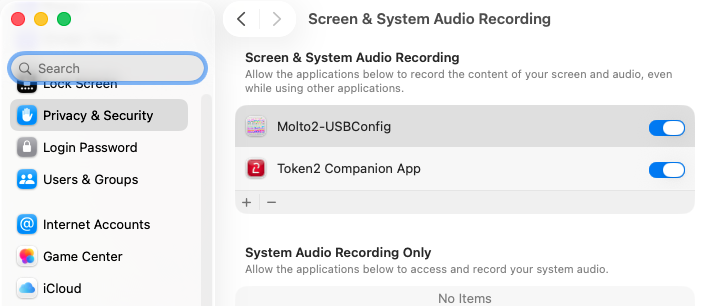
For reliable scanning, make sure the QR code is fully visible, large enough, and not obscured by other windows or overlays.On macOS, the system will prompt you to grant Screen Recording permission before QR scanning can work. If scanning fails, you can manually enable this permission in:
System Settings → Privacy & Security → Screen & Audio Recording
HOTP Configuration Guide
Prerequisite
Ensure the HID-HOTP channel is enabled in File → Device Settings. It is disabled by default in devices running firmware 3.3 or later.
Steps to Configure HOTP
- Access HOTP Settings:
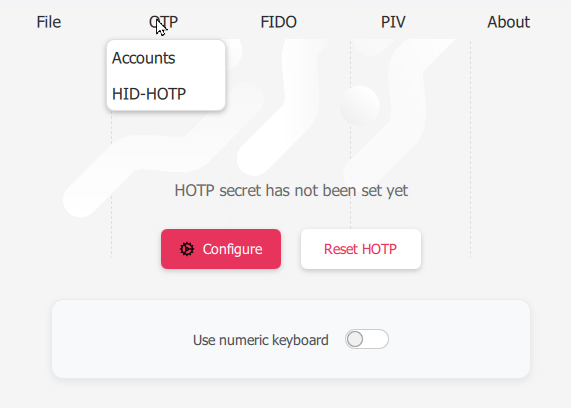
- Go to OTP.
- Select HID-HOTP from the dropdown menu.
- Set Up HOTP:
- If the HOTP secret is not set, click Configure.
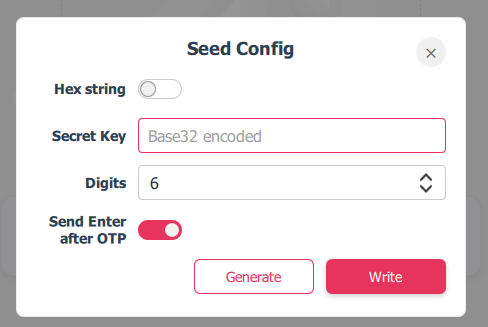
- Configure Seed:
- Choose between Hex string or Base32 encoded (default).
- Enter your Secret Key.
- Set the number of Digits (default: 6).
- Enable Send Enter after OTP if needed.
- Generate or Write Seed:
- Click Generate to randomly generate a new secret key.
- Click Write to manually input or confirm your secret key.
- Numeric Keyboard:
- Enable Use Numeric Keyboard for layouts that don't allow direct digit input (e.g., AZERTY).
- Reset HOTP:
- Click Reset HOTP to clear the current configuration.
3. FIDO Management
Administrative Privileges
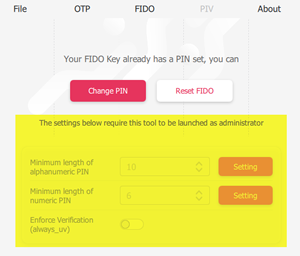 Important: Some operations in the Token2 Companion App may require administrative privileges on your computer:
- Changing or setting the FIDO2 PIN via USB can usually be done without admin rights.
- Modifying FIDO settings (e.g., enforcing user verification, resetting FIDO applet) typically requires launching the app as an administrator.
- Managing devices via NFC may also require admin rights, depending on your system configuration.
- OTP and PIV features: Can be used without admin rights.
FIDO Settings & PIN
Change or set up the FIDO2 PIN for authentication. Increase the minimum PIN length (managed separately for numeric and alphanumeric PINs).
You can also enforce the user verification setting of the device to always be required (always_uv), regardless of the relying party's settings.
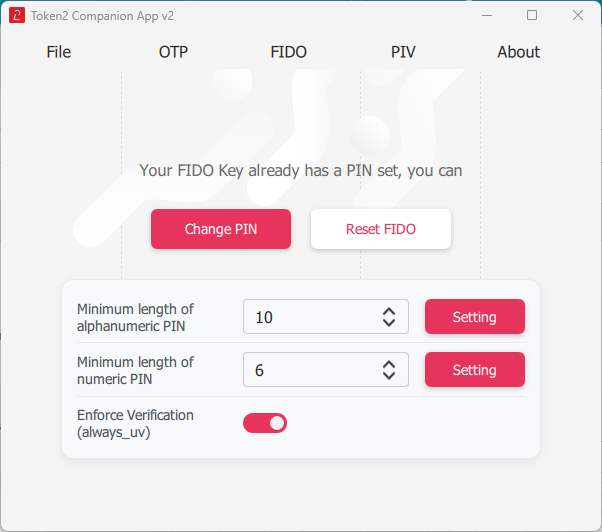
You can also use the "Reset FIDO" button to reset the FIDO Applet to factory settings.
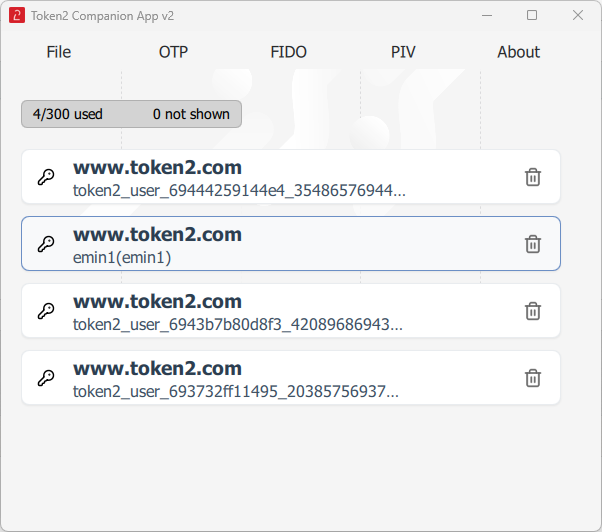
Passkey Management
View or remove FIDO2 credentials stored on the device.
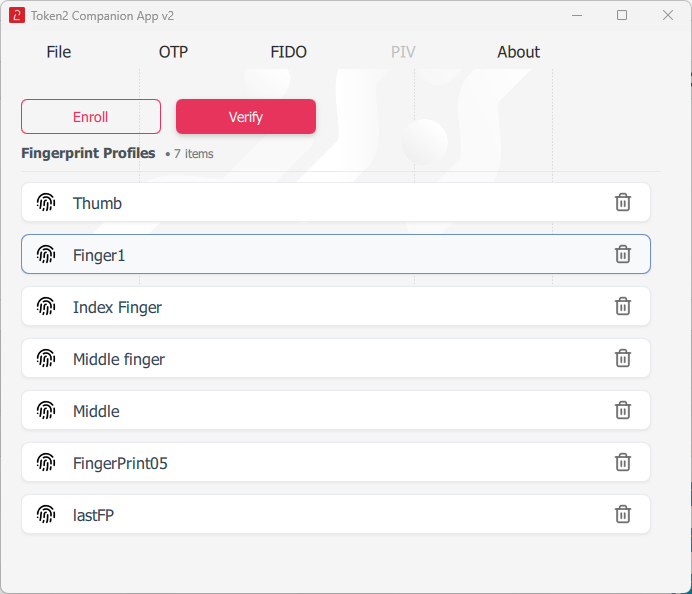
Fingerprint Management
Register or manage fingerprint authentication for FIDO2 credentials. You can enroll, verify, rename, or delete fingerprints.

4. PIV Management
PIN and PUK Management
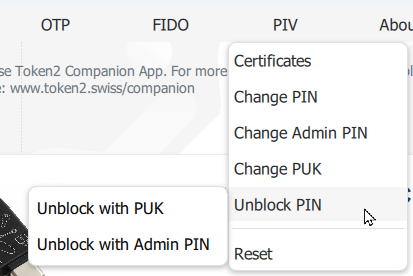
- Change PIN: Update the PIV PIN.
- Change Admin PIN: Update the administrative PIN for the PIV.
- Change PUK: Update the PUK (Personal Unblocking Key).
- Unblock PIN: Unblock the PIV PIN if locked. You can unlock the PIN using PUK or Admin PIN.
- Reset: Perform a full factory reset of the PIV applet. This removes all PIV credentials and resets the PIN, PUK, and Admin PIN to their default values.
Handle with care — reset action is irreversible.
Default PIV PINs
Default User PIN (6-digit): 865362
Default User PIN for Octo models (8-digit): 88653622
Default PUK: 86536286
Default Admin PIN: 865362865362865362865362865362865362865362865362
Certificate Management
You can store up to 15 certificates on Token2 PIV-enabled devices. Certificates can be generated or imported using the PIN or Admin PIN, but they can only be used (for authentication) with the regular user PIN. The user PIN can be reset or unblocked using the PUK or Admin PIN.
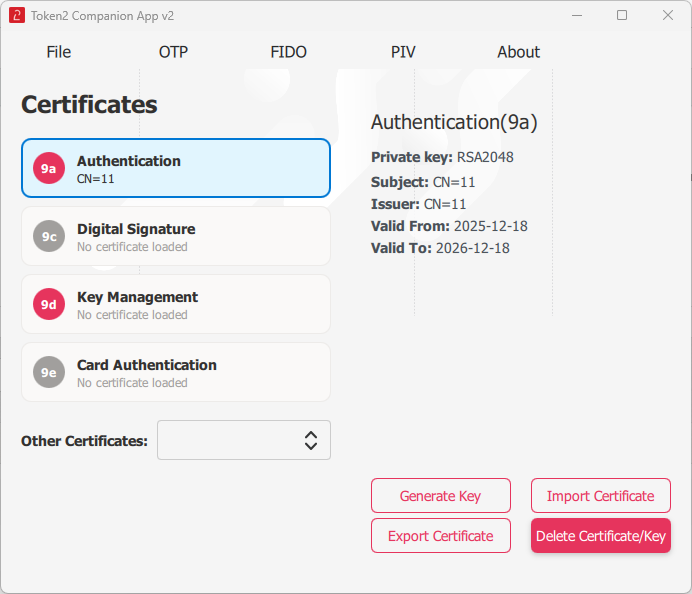
- Generate Key: Create a new key pair for a certificate.
- Import Certificate: Import an existing certificate.
- Export Certificate: Export a certificate to a file.
- Delete Certificate/Key: Remove a certificate or key.
5. Get the Companion App
Download the application for your platform to manage your authentication tokens
Desktop
Linux
rust-based
read moreRust-based Keyroost edition with support for the Token2 OTP applet and Token2 PIN+ defaults.
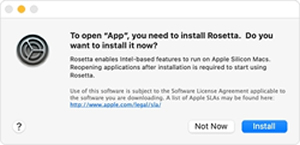 * During setup under macOS, the wizard may prompt you to install Rosetta. Rosetta is an Apple component that allows Macs with Apple Silicon (M1, M2, etc.) to run apps built for Intel-based Macs. Installation is quick and handled automatically by macOS.
Subscribe to our mailing list
Want to keep up-to-date with the latest Token2 news, projects and events? Join our mailing list!